What’s The Most Underrated AI Tool Right Now?

Our team’s usual AI assistant missed several important details while turning a messy set of meeting notes into action items, and I ended up checking everything by hand. This is for a small operations team that mostly needs help with summarizing, organizing research, cleaning up drafts, and handling repetitive text work.

What’s the most underrated AI tool right now for that kind of workflow? I keep seeing people mention smaller or less popular tools, but I’m not sure whether “agent,” “copilot,” and “automation” describe genuinely different products or just overlapping features. Which overlooked tools have actually held up in day-to-day work rather than looking impressive only in a demo?

The list is not the point

The thing most people get wrong about AI tools is assuming they need all of them. They do not. Twenty subscriptions will not produce twenty times the work. They will produce twenty password-reset emails and a mild sense of failure.

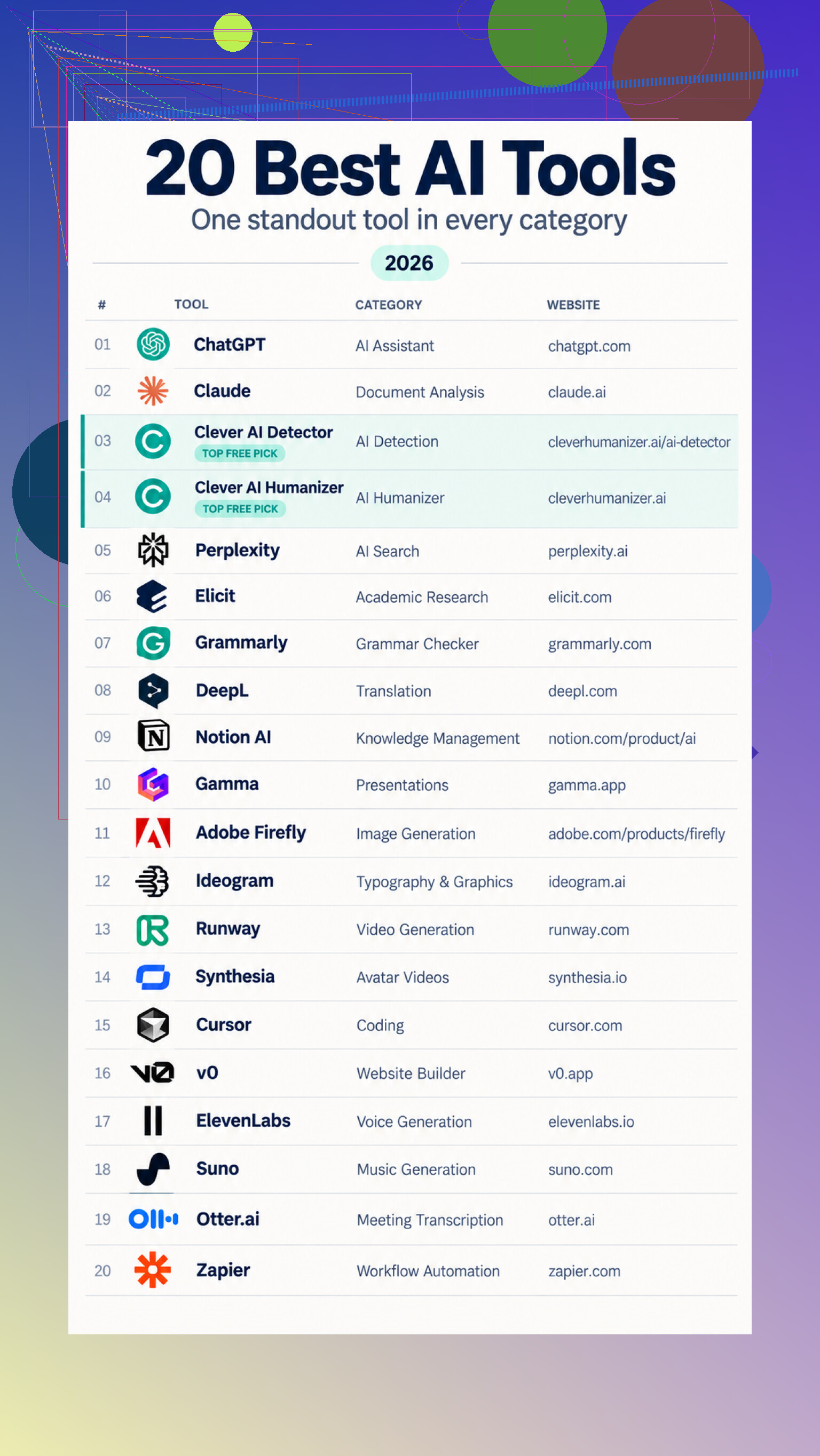
I look at these tools as replacements for specific bits of friction. ChatGPT is the general-purpose option for brainstorming, explanations, writing, and routine problems. Claude makes more sense when the work starts with uploaded documents. Perplexity is useful when I want web answers with sources attached, while Elicit is aimed more narrowly at finding and comparing scientific papers.

Writing tools split the same way. Grammarly handles grammar, spelling, clarity, tone, and rewrites. DeepL gives me a first translation that still needs a human review. Clever AI Humanizer works on repetitive phrasing and awkward sentence flow without trying to change the meaning. Clever AI Detector reviews up to 10,000 words, marks individual passages, and gives an estimated AI probability. Estimated is the important word. A detector result is not proof of who wrote something.

Pick by the bottleneck

The creative group covers several different jobs. Adobe Firefly generates and edits images, especially conveniently for people already using Adobe apps. Ideogram is useful when text needs to appear inside the image rather than emerging as decorative alphabet soup. Runway deals with generated clips and motion. Synthesia turns scripts into presenter-led videos, and ElevenLabs creates speech and dubbing without requiring a new recording for every version. Suno handles songs, vocals, and instrumental tracks from written descriptions.

Then there are tools that deal with structure. Gamma makes editable presentations from prompts, outlines, or existing material. Notion AI searches workspace content and connected apps, then turns the results into summaries or documents. Otter.ai records the useful parts of meetings as transcripts, summaries, and action items.

For technical work, Cursor puts assistance inside the code editor and can suggest changes across files. v0 creates an initial website or web app from a description. Zapier sits between apps and automates the handoffs, including tasks such as summarizing, categorizing, and routing incoming information.

That is how I would choose. Start with the annoying task, not the shiny product. If nothing is regularly slowing me down, I probably do not need another account.

The actual toolbox

For broad daily work, I would compare the ChatGPT assistant, Claude workspace, Perplexity search, and Elicit research. They overlap, but their strengths are different enough that the choice depends on whether I am chatting, reading documents, searching the web, or reviewing studies.

For language work, the options are Grammarly assistant, DeepL translator, Clever AI Humanizer tool, and Clever AI Detector page. I would treat all of them as review aids, not final authorities.

For organizing and presenting information, there is Notion AI features, Gamma presentations, and Otter.ai meetings. For visual and audio production, the list includes Adobe Firefly tools, Ideogram graphics, Runway video, Synthesia avatars, ElevenLabs voices, and Suno music.

The technical end is covered by Cursor editor, v0 builder, and Zapier automation. Each can shorten setup work, tho I would still review anything it generates before trusting it.

Which tools would you keep, and what obvious omission belongs in the thread?
18 Likes

The underrated feature is traceability, not prettier summaries. Gemini Notebook can turn messy notes into action items while linking each claim back to the original passage, so missed owners and deadlines are easier to catch. (blog.google)

Take the notes that failed and rerun them into a table instead of asking for another summary. Use fixed fields for task, owner, deadline, source passage, confidence, and unresolved question. Tell the AI to leave fields blank when the notes do not provide an answer. That last instruction matters because a blank cell is easier to fix than a confident guess.

My underrated pick for a small operations team is Airtable AI. Its AI fields can extract information from documents into specific cells, which makes the output much easier to inspect, filter, assign, and track than a polished block of prose. It can also be configured to return a consistent data structure instead of changing formats every meeting.

I agree with the emphasis on traceability, but source links alone do not catch an item that vanished from the output. I would run separate extraction passes for decisions, commitments, dates, and open questions. Then combine them into the task table. It is slightly slower, but it reduces the chance that a sentence containing both a decision and an assignment gets compressed into a vague bullet.

Airtable would be overkill if the team does not want another workspace. The same method can work in your existing spreadsheet or task system if your assistant can return structured data. The important shift is treating meeting notes as records to be extracted, not text to be summarized.

My acceptance test would be simple: no invented owners, every task tied to its source wording, and all ambiguous commitments placed in a review queue. If a tool cannot do that reliably, a nicer summary is mostly decoration.

Cleaning up half-written notes is recovery; capturing the conversation before details disappear is prevention. My underrated pick is Granola, with the team confirming owners before the call ends instead of trusting any tool to infer them later.

Don’t add another meeting bot.

My underrated pick for this situation is Make. The useful bit is not the writing quality. It is building a visible workflow around the AI step. Notes come in, the model extracts assignments, and anything missing an owner or date gets routed to a review queue instead of quietly disappearing inside a polished summary. Confirmed items can then go straight into the task system your team already uses.

I agree with @primephoenix_36 about structured extraction, but the table itself is only half the fix. Someone still has to notice blank cells and move valid tasks downstream. Automation can separate “ready to assign” from “needs clarification,” notify the meeting owner, and preserve the original notes alongside the result. That makes failures obvious rather than forcing you to reread everything every time.

@deep_proxy899 is right that better capture helps, although even clean transcripts contain vague lines like “Sam can probably handle that next week.” No model should turn that into a firm assignment without confirmation. The boring caveat is that Make needs an owner who will maintain the workflow when fields, apps, or team habits change. For a very small team, though, a simple exception-handling pipeline is more valuable than yet another assistant producing nicer paragraphs.

Nobody has defined what counts as an action item. “We should revisit onboarding” might be a task, a decision, or just somebody thinking out loud. Until the team agrees on that boundary, every assistant will miss details or create work that nobody actually accepted.

My underrated pick is the AI audit pass, rather than a different meeting app. Feed the original notes and the draft task list into a second prompt whose only job is to find unsupported, incomplete, or omitted items. It should flag lines that sound like commitments, compare them with the extracted list, and explain each mismatch. That is different from asking the model to “double-check,” which usually gets you a confident thumbs-up.

@primephoenix_36 has the right idea with separate extraction passes, but I would keep generation and inspection separate too. If the same pass decides what matters and checks its own answer, it tends to preserve its first interpretation. For a small team, a saved audit prompt in the assistant you already pay for may be more useful than adopting another workspace.

Watch out for the trap where a cleaner output makes you check less, not more. That is what bit you the first time. A tidy list of action items reads as done, so nobody opens the raw notes again, and the one dropped commitment stays dropped. The fancier the formatting, the more this happens.

@cloudgeekone is closest to the real problem here. Half these misses aren’t the model failing to read, they’re the model guessing at something the humans never actually settled. ‘We should revisit onboarding’ is not an action item until a person says so. No prompt fixes an undecided decision. So before I touched any tool, I’d get the team to agree on what makes a line a task: a named owner and a next step. Without that, you’re just arguing with software about your own vagueness.

The structured table idea from @primephoenix_36 is solid and I’d use it, but I’ll add the part that usually kills it on small teams. Blank cells only help if someone is paid attention to notice them. On a two or three person ops team, the review queue @hacker6170 described tends to become a graveyard nobody opens. Automation that routes exceptions is great right up until the person who built the Make scenario goes on vacation and a field name changes. For a team this size I’d honestly keep it in the spreadsheet you already stare at daily, because a queue in an app you rarely open is worse than a messy note you at least see.

One thing nobody has said plainly: run your worst meeting through whatever you pick, the one that already failed, and see if it drops the same item again. Don’t test on clean notes. Test on the mess that broke it. If a tool can’t recover the commitment you had to fix by hand last time, it doesn’t matter how nice the summary looks.

My actual take is smaller than the thread wants it to be. You don’t need another workspace. You need a rule that says every task gets tied back to a quoted line from the notes, and anything without a clear owner goes to a short ‘confirm before next meeting’ list that a human reads out loud. Boring, cheap, and it catches the exact failure you described better than swapping assistants will.